
Tonewheel Organ
Put the organ on a channel, set the sound on the drawbars and use your controller’s faders.
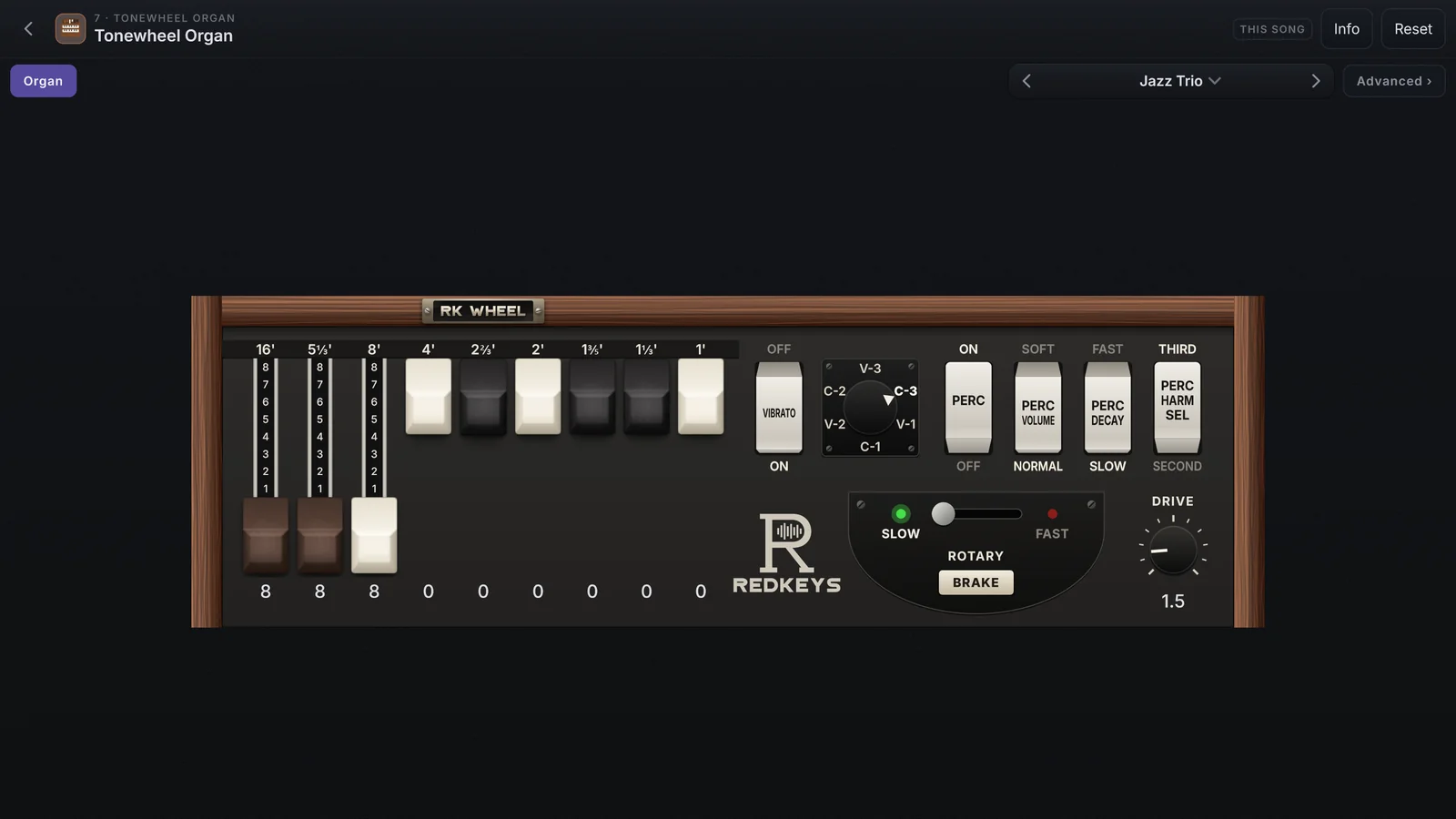
The Tonewheel Organ is a tonewheel organ built into the app: 91 tonewheels made live, 9 drawbars, percussion, vibrato and chorus, amplifier, rotary cabinet and drive, with 113 presets.
Put the organ on a channel
- On the stage, tap Edit on the channel, then Change.
- In the Plugins category, tap Tonewheel Organ.
- In the drawer, tap Edit ›: the organ page opens in place of the sound page.
The organ arrives on the first preset of its list, ready to play. Reset, at the top, goes back to it (tap twice).
The face
| On the face | What it does |
|---|---|
| Drawbars 16' to 1' | The 9 bars: pull one down to add that pitch, from 0 to 8 |
| VIBRATO | Turns the vibrato or chorus on and off |
| Selector V-1 to C-3 | Picks the type: V-1, V-2 and V-3 are vibratos; C-1, C-2 and C-3 are choruses |
| PERC | Turns on the percussion: a short tone at the start of the note |
| PERC VOLUME | SOFT or NORMAL |
| PERC DECAY | FAST or SLOW |
| PERC HARM SEL | SECOND or THIRD: the pitch of the percussion |
| SLOW / FAST | The rotary cabinet’s speed |
| BRAKE | Stops the rotary cabinet |
| DRIVE | Saturation, from 0 to 10 |
The percussion only sounds again after you let go of every key: notes played legato do not get it.
Working it
- Drag a drawbar down to pull it out and up to push it in, one step at a time. The mouse wheel also moves one step.
- You can type the number under each bar.
- Ctrl/Alt + click takes it back to its default.
- The tabs and the SLOW / FAST switch change with a tap anywhere on them.
The presets
The ‹ name › selector, in the row of tabs, shows the preset the organ is on. A * after the name means you changed something (SLOW / FAST and BRAKE do not count). With no preset, it shows No preset.
- The arrows step through the presets: the factory ones first, then yours.
- Tap the name to open the list, with Save as… and Manage presets….
Your controller’s faders become drawbars
While the organ page is in view, faders 1 to 8 and the Master fader on your controller move that organ’s 9 drawbars, with no Learn. Close the page and they go back to the mixer. For this, the faders must be learned in MIDI › Controllers.
Two organs on one channel
Each layer with the organ is a whole organ, with its own drawbars, preset and settings. Use two on one channel, one above and one below in a split, each with its own registration. The faders move the organ whose page is open.