
Aurora, the synthesizer
Put Aurora on a channel and learn its face, section by section.
Aurora is a polyphonic synthesizer built into the app: its sound is made live, with no samples. It has 32 voices, unison of up to 6, its own arpeggio and portamento, and 1,479 presets in three banks.
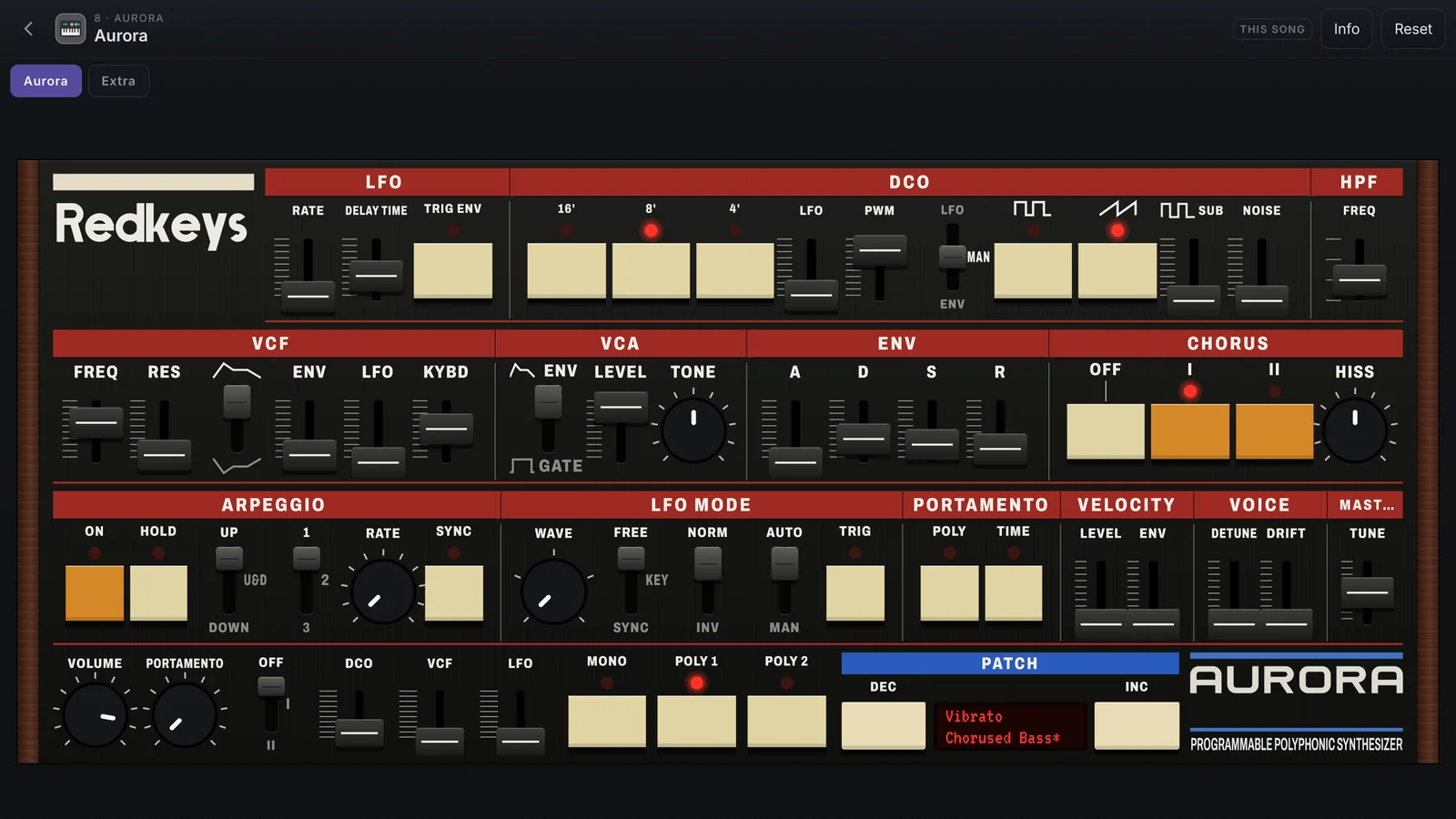
Put Aurora on a channel
- On the stage, tap Edit on the channel, then Change.
- In the Plugins category, tap Aurora.
- In the drawer, tap Edit ›: Aurora’s face opens in place of the sound page.
Aurora arrives on the first preset of its list, ready to play. Reset, at the top, goes back to it (tap twice).
The face
The face is the same on phone, tablet and desktop. On a small phone screen it splits into the Oscillator, Filter and Control pages, with the bottom strip always in view.
| Section | Controls | What for |
|---|---|---|
| LFO | RATE, DELAY TIME, TRIG ENV | The LFO’s speed and how long before it comes in |
| DCO | RANGE 16' 8' 4', LFO, PWM, LFO / MAN, pulse, sawtooth, SUB, NOISE | The oscillator: the octave, the waves and the mix |
| HPF | FREQ, in 4 positions | Cuts the lows; position 0 boosts the bass |
| VCF | FREQ, RES, polarity, ENV, LFO, KYBD | The filter: cutoff, resonance and what moves it |
| VCA | ENV / GATE, LEVEL, TONE | The volume follows the envelope or opens and closes with the key; TONE leans to the lows or the highs |
| ENV | A, D, S, R | The envelope |
| CHORUS | OFF, I, II, HISS | The chorus: I, II or both lit together; HISS is the chorus hiss, from 0 (none) to 10 |
The control row
| Section | Controls |
|---|---|
| ARPEGGIO | ON, HOLD, MODE (UP, U&D, DOWN), RANGE (1, 2, 3), RATE, SYNC |
| LFO MODE | WAVE, FREE / KEY / SYNC, NORM / INV, AUTO / MAN and TRIG |
| PORTAMENTO | POLY and TIME |
| VELOCITY | LEVEL and ENV |
| VOICE | DETUNE and DRIFT |
| MASTER | TUNE |
The bottom strip
- PORTAMENTO (the knob) and the OFF · I · II switch.
- The DCO, VCF and LFO faders: how far the pitch bend moves the pitch and the filter, and how much the mod wheel opens the vibrato.
- MONO, POLY 1 and POLY 2: the voice mode.
- PATCH: DEC, the display and INC, for the presets.
- VOLUME: the output level. It stays out of the presets and applies to every Aurora in the app.
The Extra page
The Aurora | Extra tabs swap the face for the Extra page, with what the face does not have: the 64' 32' 2' octaves, the pulse and saw levels (MIXER), the polarities (POLARITY), the mod wheel on the filter (WHEEL), a second envelope (ENV-2), which envelope drives the VCA, and the chorus DEPTH. On a small phone screen these are the Extra and Extra 2 pages.
Working the controls
- Drag a fader. A double tap opens the field to type the value.
- Keys and switches change with one tap.
- Ctrl/Alt + click takes a fader back to its default.
- Every control can be mapped with MIDI Learn, a macro or the wheels. See MIDI Learn.