
What the Arpeggiator is
Learn where the Arpeggiator lives in the channel, what it arpeggiates and how its page is laid out.
The Arpeggiator turns the chord you hold into an arpeggio, in the song's tempo. It is a MIDI effect: it lives in the MIDI slot of an instrument channel, before the instrument. Like the other effects, it switches on and off, has presets and is saved in the song and in the parts.
What goes through it
- Everything that enters the channel: the keyboard, the on-screen keyboard and the DrumPads sequences aimed at that channel.
- The notes from all these sources add up to a single chord.
- Every layer of the channel gets the arpeggio.
- With On unlit, the notes go straight to the instrument.
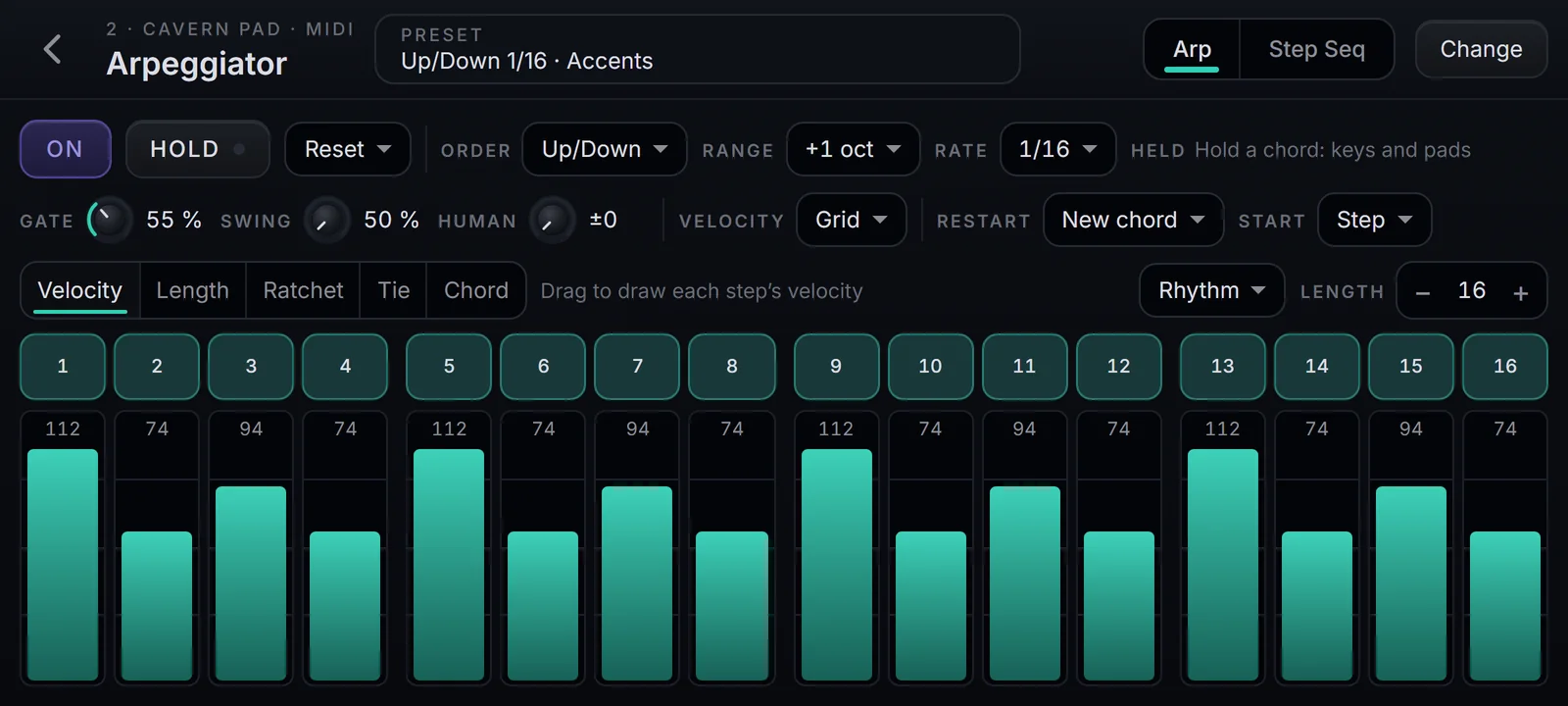
The page
The settings sit on top; the step grid sits below. The layout is the same on Desktop, Tablet and Phone.
| On screen | What it does |
|---|---|
| Back arrow | Returns to the channel |
| Preset | Opens the preset list |
| Arp and Step Seq | Choose the mode |
| Change | Opens the MIDI effects list, to swap the slot's effect |
| On | Switches the Arpeggiator on and off |
| Hold | Keeps the notes after you let go of the keys |
| Held | Shows the notes the arpeggio is using |
| Gate, Swing, Human, Velocity | Note length, swing and note strength |
| Restart and Start | When the pattern starts over and where the arpeggio comes in |
| The grid | The steps, the edit lanes, Rhythm and Length |